Unlock the Full Potential of Your HUAWEI nova Y91 Tips and Tricks for an Unparalleled Experience
The HUAWEI nova Y91 is a true marvel in smartphone technology. Packed with cutting-edge features and sleek design, the HUAWEI nova Y91 promises to elevate your mobile experience to new heights. To help you make the most out of this incredible device, utilise a comprehensive range of tips and tricks that will enable you to
Unlock the Full Potential of Your HUAWEI nova Y91 Tips and Tricks for an Unparalleled Experience
The HUAWEI nova Y91 is a true marvel in smartphone technology. Packed with cutting-edge features and sleek design, the HUAWEI nova Y91 promises to elevate your mobile experience to new heights. To help you make the most out of this incredible device, utilise a comprehensive range of tips and tricks that will enable you to harness its full potential. From optimising performance to discovering hidden features, let’s dive into the world of possibilities that await you with the HUAWEI nova Y91!
Dark mode for enhanced battery life and intelligent battery management
Make the most of the HUAWEI nova Y91’s OLED display by utilising the Dark Mode.
Found in Settings > Battery. Dark Mode reduces power consumption and enhances battery life, all while offering a sleek and stylish interface.
To optimise battery performance further, utilise the battery optimization feature. This intelligent system learns your usage patterns and allocates resources efficiently, extending your battery life.
You can also embrace these exceptional features, the 7000 mAh Super Battery and 22.5 W HUAWEI SuperCharge, which will power you throughout the day.
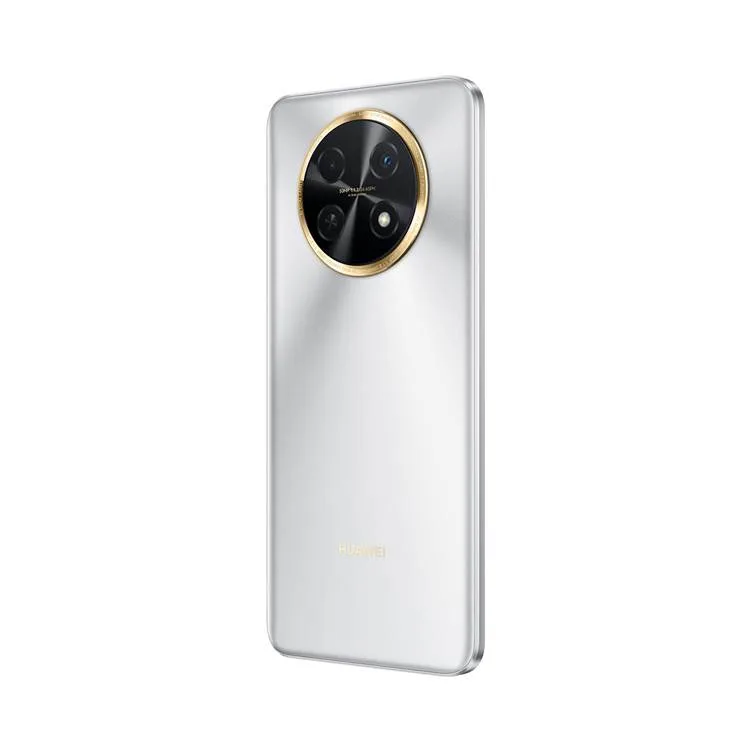
Customise your home screen and enjoy the expansive view
Personalisation is key to making your HUAWEI nova Y91 truly yours. Experiment with different wallpapers, app icons, and widget layouts to give your home screen a unique touch. Long-press an empty area on the home screen and tap “Home screen settings” to unleash your creativity.
With the vast 6.95-inch HUAWEI FullView Display which gives you an expansive view and nimble tap and scroll operations, backed by a 270 Hz touch sampling rate, you’ll definitely enjoy the look and feel of this stunning smartphone.
To enhance your digital experience, you can also enable navigation gestures on your settings. Gestures offer a more immersive experience, with swipes and taps enabling seamless navigation throughout your phone. For example you can use the Knuckle Gesture to take a screenshot. using Knuckle Gesture. Make sure that it is enabled by going to Settings > Accessibility Features > Shortcuts & Gestures > Take Screenshot
Once you have turned on the Knuckle gesture, here’s how you can take the screenshot; open the content you want to screenshot and knock the screen twice. The system will take the screenshot for you and save it your gallery.
Use the Super Volume with 20 levels of adjustments
The stereo dual-speaker system brings out sounds lurking beneath the surface, to enhance the appeal of timeless songs, and heighten the thrill of your favourite films and games.
To get the best audio experience, make use of the Dual 0.8cc Big Cavity that provides better bass frequency performance, three-dimensional surround and stronger sense of presence resulting in louder effects. The Histen 8.1 balances sound effects, restoring the texture and clarity of the sound for all low, medium and high frequency bands. Together with a Space Sound Field, the sound field covers a wider range, providing you with “cinema level” sound quality allowing you to experience immersive sound effects while gaming or watching movies.
To switch listening devices, you can head to the audio control panel or manage audio playback.
Upgrade your storage space
When it comes to limited storage, constantly receiving prompts for insufficient space can be a hassle when downloading new games or media content. The HUAWEI nova Y91 offers an impressive 256GB providing users with ample space to store apps and media content without having to worry about running out of memory space. You can easily store 340 episodes of popular dramas, 22,000 high-quality songs, and 140 high-definition video content.
To tidy up your storage, open Optimizer and select Cleanup. Your phone will generate a list of photos, videos, installation packages and other files, giving you the option to keep the files want and toss those you want to delete. When your phone is charging and the screen is off, Optimizer will work quietly in the background to clear app caches and junk files. This helps to keep your phone agile and running smoothly.
With the HUAWEI nova Y91, you hold a powerful and feature-rich smartphone in your hands. By implementing these tips and tricks, you can take your device experience to unparalleled heights. From optimising performance and enhancing battery life to discovering hidden features, this smartphone is ready for you to unlock new possibilities.